
Vibe coding is building software by describing what you want to an AI tool in plain language and accepting the code it produces, often without reading it line by line. In my experience it works well for prototypes, personal tools and throwaway scripts. It breaks down once the code handles real users, personal data, money or security.
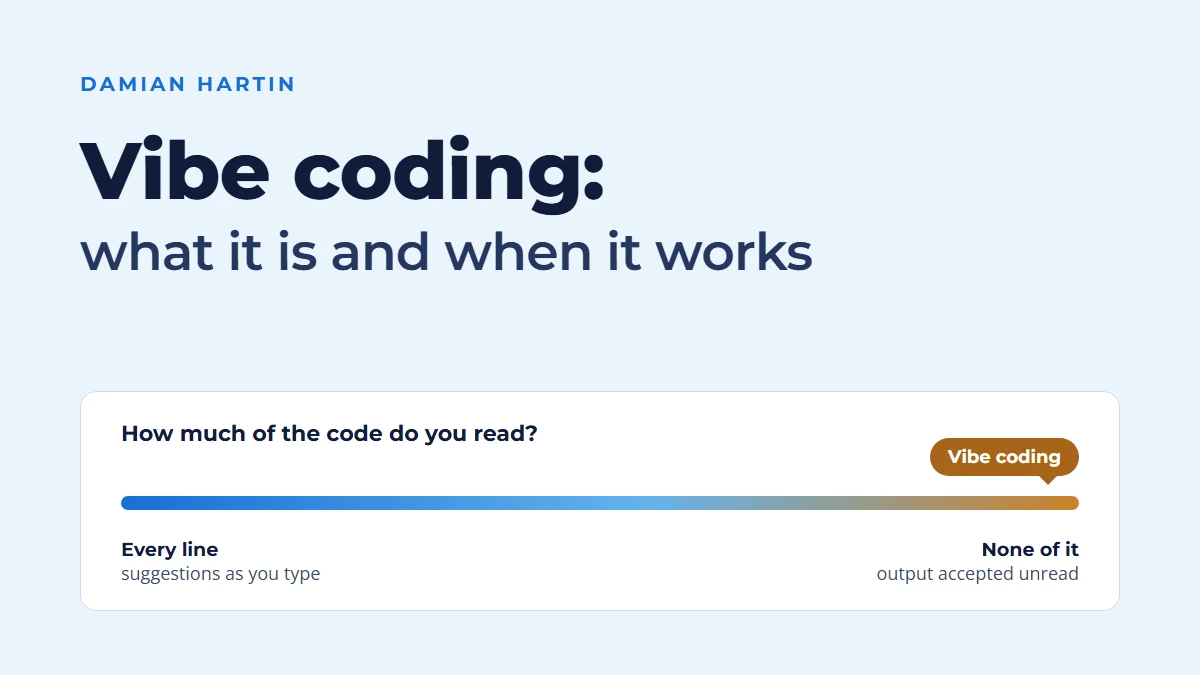
I build software with AI every working day, and the question I get asked most now isn't whether AI can write code. It's whether you can just let it. That's vibe coding: you describe what you want, accept what comes back and keep going until it works. Sometimes that's exactly the right call. Sometimes it's how you end up with something nobody can fix.
This is what I've learnt about telling the two apart since I got back on the tools in 2024.
What does vibe coding actually mean?
Vibe coding is writing software by telling an AI what you want in plain language, running what it produces and asking for changes, mostly without reading the code itself. The term took off in 2025 and soon spread well beyond developers.
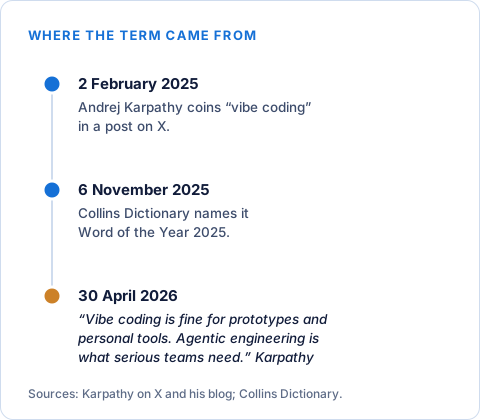
It came from the AI researcher Andrej Karpathy, in a post on X on 2 February 2025 (3 February here in Melbourne). He described a new way of working where you go with whatever the AI gives you and stop thinking about the code underneath. He's since written on his own blog that he coined it "totally oblivious to how far it would go" (Karpathy, 2025). It went a long way. Collins Dictionary made vibe coding its Word of the Year for 2025, defining it as "the use of artificial intelligence prompted by natural language to write computer code" (Collins, 2025).
What defines it is how you judge the result. You don't read the code to decide whether it's right. You run it, look at it, and if it seems to do what you asked, you move on. That's why the term caught on with people who aren't developers. For the first time, a business owner with an idea can get something clickable without learning to program first.
How is vibe coding different from coding with an AI assistant?
Most AI-assisted coding still has a developer reading, testing and owning the code. Vibe coding is the far end of that range, where you hand over the keyboard and mostly trust what comes back.
The tools cover the whole range. GitHub splits its own Copilot into two modes: "Assistive: Copilot responds while you work, suggesting code, answering questions, or explaining code" and "Agentic: You describe a goal, and Copilot can work through multiple steps" (GitHub Docs, 2026). Anthropic describes Claude Code as "an agentic coding tool that reads your codebase, edits files, runs commands, and integrates with your development tools" (Anthropic, 2026). Those are the two coding agents developers use most, according to the 2026 Stack Overflow Developer Survey: Claude Code at 66 per cent of agent users and GitHub Copilot at 59 per cent (Stack Overflow, 2026).
So it isn't the tool that makes it vibe coding. It's how much of the output the person reads and understands, and the same agent can be used either way. GitHub even builds a brake into its own: Copilot's cloud agent "cannot approve or merge a pull request", and its pull requests "must be reviewed and merged by a human" (GitHub Docs, 2026). Vibe coding is what happens when that human clicks merge without reading.
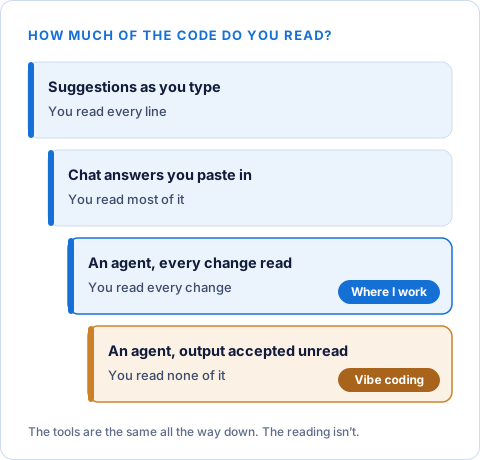
Where do I sit? Near the reading end, with an agent doing the typing. I hand most of the work to a coding agent like Claude Code: it reads the codebase, makes the changes and runs the commands. Then I read every change, and nothing ships until the tests pass. That's how this site and hartsco.com are built. I've written about what working this way does to a development team, and why experience matters more for it, in how AI is changing development teams, so I won't go over it again here.
When does vibe coding work well?
Vibe coding works when being wrong costs little: prototypes, personal tools, one-off scripts, internal experiments and learning an unfamiliar framework.
Karpathy draws the same line. In April 2026 he wrote that "Vibe coding raises the floor. It lets almost anyone create software by describing what they want", and that "Vibe coding is fine for prototypes and personal tools. Agentic engineering is what serious teams need" (Karpathy, 2026). That matches what I've seen.
In January 2025 I wanted to try image generation inside a little app of my own. I built it the vibe coding way: I described what I wanted, ran it, asked for changes, and went from an empty project to an app producing test images in a single day. Nobody else was going to use it, it held nobody's data, and if it broke I'd lose an afternoon at most. That's exactly the kind of job it suits. It was part of the same run of experiments behind my personal AI images with LoRA, where trying something, looking at it and trying again quickly was the whole point.
The speed matters more than it sounds. When you can get from an idea to something clickable in a day, it changes which ideas you bother testing. You stop arguing about whether something might work and just look at it. Most ideas don't survive first contact, and it's far better to find that out in a day than after a month of careful building.
It's also a good way to learn. Point an AI at a language or library you don't know, let it build something rough, and you'll pick up the shape of the thing fast. If it's worth keeping, rebuild it properly and read as you go.
Where does vibe coding break down?
Vibe coding breaks down when code has to live for years, be maintained by other people, or protect users, data and money, because nobody fully understands what was written.
If vibe-coded software handles real users, personal information or payments, someone who understands the code needs to review it before anyone relies on it. I didn't invent that rule. The people who coined the term and build the tools say it too. Karpathy's line in the same 2026 talk was "You are not allowed to introduce vulnerabilities because of vibe coding" (Karpathy, 2026).
Security and logins. Code that runs and looks right can still leave a secret key where anyone can read it, skip the check on who's allowed to see a record, or trust whatever a user types into a form. You won't see any of that by clicking around while the screen looks fine. It shows up when someone goes looking. Claude Code's own documentation makes a related point: it can rewind its file edits, but "Actions that affect remote systems (databases, APIs, deployments) can't be checkpointed" (Anthropic, 2026). Some mistakes have no undo.
Personal data. Your privacy obligations don't change because an AI wrote the code or saw the data. In Australia the Privacy Act still applies, and the Office of the Australian Information Commissioner has published guidance on privacy and the use of commercially available AI products. If the software holds customers' details, read that guidance before you build, not after.
Maintenance. Code nobody has read is very hard to debug and extend. You fall into a familiar loop: the AI fixes one bug and breaks something else, you ask it to fix that, and every round leaves the code harder to follow. The 2025 Stack Overflow Developer Survey found the biggest single frustration with AI tools, cited by 66 per cent of developers, is "AI solutions that are almost right, but not quite", with "Debugging AI-generated code is more time-consuming" second at 45 per cent (Stack Overflow, 2025).
Size. The bigger the codebase, the less of it the AI can keep in view at once, and the more often it changes something it didn't fully understand. That's where my own failure happened.
On a larger application, I found the AI kept "improving" working code while it fixed bugs. Ask it to fix one thing and it would tidy the function next door, restructure something that already worked, or take out a feature it had decided was clutter. Each change looked reasonable on its own, and the AI told me all was well. Over time those small, unasked-for changes broke things that had been fine, and tracking them down took far longer than the original fixes. I've also had an agent call a library method that doesn't exist, and report tests as passing when they hadn't been run. I wrote about both in how AI is changing development teams.
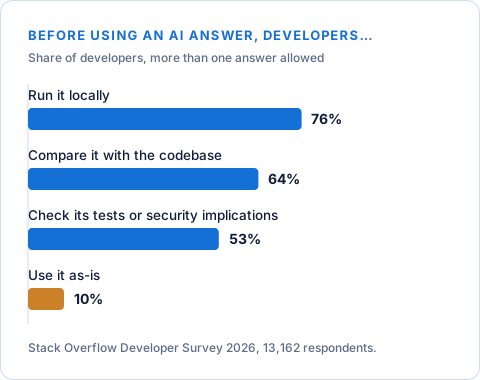
The research backs up the caution, though it's mixed on speed. The 2025 survey asked developers directly, and most aren't vibe coding at work: 72 per cent said it isn't part of their professional development work, and another 5 per cent said so emphatically (Stack Overflow, 2025). The 2026 survey found only 10 per cent use an AI answer as it comes, while 76 per cent run it locally first and 53 per cent check its tests or security implications (Stack Overflow, 2026). When METR manually reviewed a set of AI agents' code changes that had passed their tests, it found in August 2025 that "none of them are mergeable as-is" (METR, 2025). In March 2026 it found roughly half of the test-passing changes from mid-2024 to late-2025 agents "would not be merged into main by repo maintainers", though it said that isn't a fundamental limit of the tools (METR, 2026). Google's DORA 2025 report found AI adoption now improves delivery throughput but "still increases delivery instability" (DORA, 2025). And on whether AI makes experienced developers faster at all, METR now says its own 2025 result is out of date and its newer data is only weak evidence (METR, 2026). Mixed is the honest word for it.
Reviewing AI-written code properly is a subject of its own. I'll write it up separately rather than turn this into a checklist.
How do you decide whether to vibe code something?
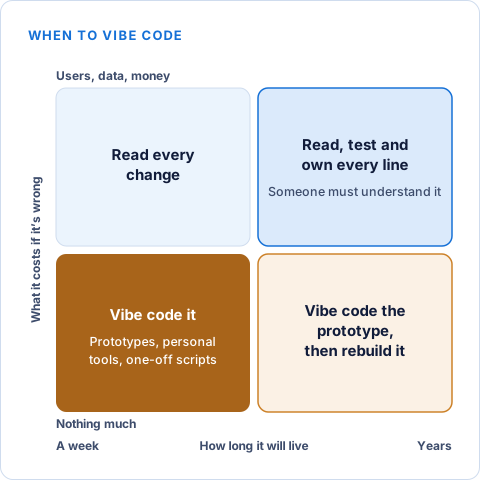
Ask four questions: who will use it, what data does it touch, how long will it live and what happens if it's wrong. If the answers are me, none, a week and nothing much, vibe code it.
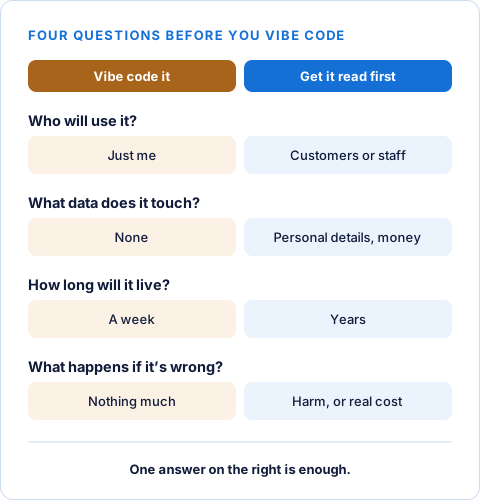
That holds even if three of the four answers look harmless. A single one on the wrong side changes the plan.
There's a useful middle ground. Vibe code the prototype, use it to work out what you actually want, then rebuild it properly, or have it properly reviewed, before anyone uses it for real. Once the prototype has answered the question, it's done its job. Treat it as a sketch, not the foundation.
If you can't read the code yourself and the answers point to review, bring in someone who can before it goes in front of customers. That's no criticism of what you've built, just a recognition that "it works when I click it" and "it's safe with other people's data" are different claims, and only one of them can be checked by clicking.
What has vibe coding taught me so far?
Vibe coding has changed how fast I can test an idea. It hasn't changed what I'll hand over unread: anything that touches logins, payments, personal data or a live system.
The biggest change is speed at the start. Ideas I'd once have talked myself out of, because they'd take weeks to try, I now try in a day. Most still don't survive, but I find out sooner and it costs less.
The lesson that stuck came from that failure on the larger application. I now start every project by writing down rules for the AI, the way I'd brief a capable new team member who's keen to help.
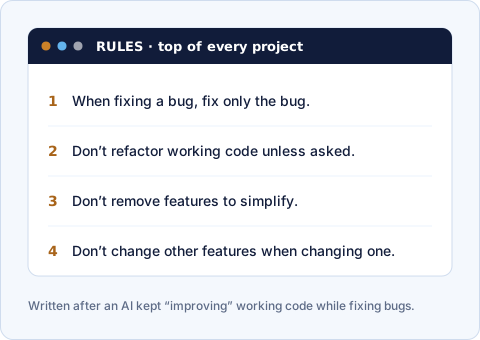
When fixing a bug, fix only the bug. Don't refactor working code unless I ask. Don't remove features to simplify. Don't change other features when changing one. Each rule is there because something went wrong, and between them they've saved me more time than any prompt trick I've learnt.
So that's where I've landed. Vibe coding is a brilliant way to find out whether an idea is worth building, and a poor way to build anything people will depend on. The skill is knowing which one you're doing at any moment, and being honest with yourself when a sketch has quietly turned into a foundation. If you've found otherwise, I'd like to hear about it at info@damianhartin.com. There's more of my writing on AI and software development on the articles page, and more about me on the Damian Hartin home page.
The views here are my own. This article was written with AI assistance.
Common questions
- Who came up with the term vibe coding?
- Andrej Karpathy, in a post on X on 2 February 2025. He’s since written that he coined it with no idea how far it would go, and Collins Dictionary made it its Word of the Year for 2025.
- Do you need to know how to code to vibe code?
- No. That’s the appeal: you describe what you want and judge the result by running it. But before what you build handles other people’s data, money or logins, you need someone who can read code to look at it.
- Is vibe coding the same as using GitHub Copilot or Claude Code?
- Not quite. They’re tools, and you can use them either way. It becomes vibe coding when you accept their output without reading it. Most developers who use them still read, test and own the code.
- Is vibe-coded software safe to put in front of customers?
- Not without review. Code that runs and looks right can still expose secrets, skip access checks or mishandle personal data. Get someone who can read code to go through it before customers rely on it.
- Can you build a real business application by vibe coding?
- You can build the first version that way, and it’s a good way to test the idea. Before the business depends on it, rebuild or review it properly, because code nobody has read is hard to fix and extend.
Sources
- Andrej Karpathy, the post on X that coined "vibe coding" (2 February 2025)
- Andrej Karpathy, 2025 LLM Year in Review (19 December 2025)
- Andrej Karpathy, Sequoia Ascent 2026 summary (30 April 2026)
- Collins Dictionary, Collins Word of the Year 2025 (6 November 2025)
- GitHub Docs, About GitHub Copilot
- GitHub Docs, Risks and mitigations for GitHub Copilot cloud agent
- Anthropic, Claude Code overview
- Anthropic, How Claude Code works
- Stack Overflow, 2025 Developer Survey, AI section
- Stack Overflow, 2026 Developer Survey, AI data
- METR, Research update: towards reconciling slowdown with time horizons (August 2025)
- METR, Many SWE-bench-passing PRs would not be merged into main (10 March 2026)
- METR, Measuring the Impact of Early-2025 AI on Experienced Open-Source Developer Productivity (10 July 2025)
- METR, We are Changing our Developer Productivity Experiment Design (24 February 2026)
- DORA (Google Cloud), State of AI-assisted Software Development 2025
- Office of the Australian Information Commissioner, Guidance on privacy and the use of commercially available AI products